Local public-service SEO: reliable answers organised around tasks
Residents should not need to understand an organisation chart to find a public service. Organise the answer around what someone needs to do.
Structure pages around procedures
List tasks such as checking opening times, preparing documents, reporting a problem or finding a location. Identify the responsible authority, steps, required documents and contact for each task. Do not present a fictional form when an application belongs on another portal.
Maintain local details
Addresses, phone numbers and opening times need sources and an owner responsible for checking them. Identify exceptional closures. Text directions and accessibility information can complement a map without depending on it. Event pages should distinguish past editions from future appointments.
Build understandable navigation
Use link labels describing the procedure rather than “click here”. Link from relevant categories. Translations should cover essential information, not merely the menu. Check PDF readability and structure and provide an HTML alternative for important procedures.
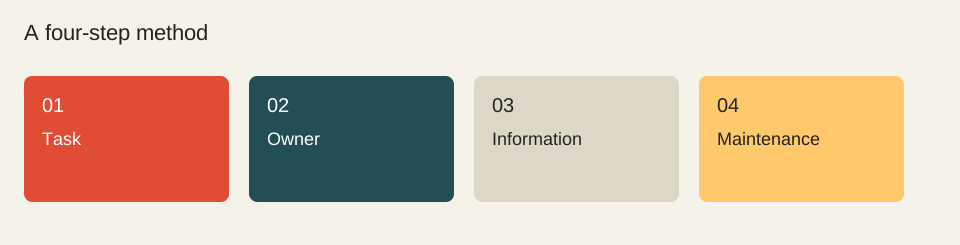
A process, not a statistical result.
Task
Owner
Information
Maintenance
Worked example
A certificate-request page can explain required documents, submission, a service-sourced timescale and a contact route. A news item announcing a counter’s opening is not a substitute for that permanent procedure.
Sources reviewed on 1 October 2026. Worked calculations use explicitly hypothetical inputs.
Topic provenance: Quel referencement pour les collectivites locales ? (2009-09). Search Engine Feng Shui. Byline retained in the publication feed: fhouste.
This guide is newly written in 2026. It does not reproduce the earlier text and is not attributed to its historical author.
A longer query can reveal a specific constraint. Length alone proves neither low competition nor better conversion. Build pages around distinct, verifiable needs.
A monthly fee tells you little without a scope. Compare deliverables, labour, technical dependencies and acceptance criteria before comparing two headline prices.
↗
Resolve ordinary hours and a dated exception before publishing
A useful service page must answer when the visitor can actually use the service on the relevant day. A newer timestamp is not enough: an ordinary timetable and a temporary exception describe different scopes. Google’s LocalBusiness documentation separates opening periods and date validity. Structured data must reflect the verified information visible to visitors; it cannot settle a disagreement between sources.
A complete fictional check
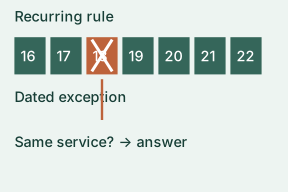
Imagine a public information desk called Desk A. Its ordinary timetable, record S1, says Monday–Friday, 09:00–17:00. A notice from the same responsible organisation, S2, says “closed on 18 November 2026 for maintenance”. These names, hours and records are invented for this exercise. They are not information about an actual authority or a promise that a real desk will open.
Identify the service: record Desk A, in-person information, and the particular location. Do not apply this notice automatically to telephone assistance, another branch or an online procedure.
Separate validity: S1 is the recurring timetable; S2 is an exception for 18 November. Keep the notice date and the date it concerns in different fields.
Write the visitor answer: “Ordinary hours: Monday–Friday, 09:00–17:00. Closed on 18 November 2026 for maintenance.” Place the exception beside the hours, not only in a news archive.
Handle a conflict: if another official notice says “open as usual” for the same desk and date, mark the disputed day unconfirmed and use the organisation’s verified contact route to clarify. Do not choose the notice with the largest date mechanically.
Review the exception: schedule a check after its validity ends. Remove outdated wording only after confirming the ordinary schedule still applies, and keep a change note in the working record.
Keep one reusable source record
Completed fields: service/location = Desk A; recurring rule = S1; exception = S2; affected date = 18 November 2026; affected channel = in person; appointment requirement = unknown; accessibility information = not supplied; next check = after the exception; outcome = recurring hours plus dated closure. “Unknown” is a useful result. It prevents a visitor from treating silence as confirmation.
For your own page, add each exact source URL, the checked passage and verification date. Test the answer with a concrete question: “Can I arrive on the affected date?” If the main answer still requires interpreting two contradictory notices, the task is unfinished. Confirm content first, then align any machine-readable fields with that same answer.