Search interfaces: suggestions, speed and reader control
Google Instant is part of search history. Its attention debate remains useful when designing a site search that lets readers understand and choose.
Distinguish suggestions and results
A suggestion completes input; a result answers an executed query. Identify which is shown. Do not replace typed text with a suggestion without the reader’s action. A local library filter can retain a result count and reset control.
Preserve keyboard access and readability
Label every control accessibly. Announce filtered-result counts without excessive interruption. Avoid moving focus after each letter or abruptly jumping the page. Short animation should respect reduced-motion preferences.
Handle empty results
An empty state should suggest another phrase or category navigation. Do not hide the entire catalogue without explanation. Avoid sending searches to a server when local filtering is sufficient and collection has no defined purpose.
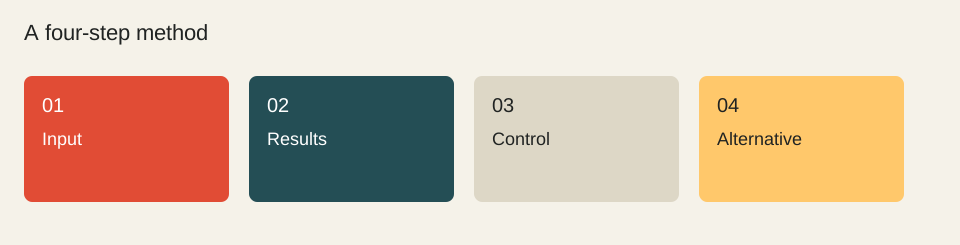
A process, not a statistical result.
Input
Results
Control
Alternative
Worked example
Our library filters titles already present in the page. Searches remain on the device, and an empty input restores the complete list.
Sources reviewed on 1 October 2026. Worked calculations use explicitly hypothetical inputs.
Topic provenance: Google Instant, ou l’abandon définitif de l’utilisateur…. (2010-09). Search Engine Feng Shui. Byline retained in the publication feed: fhouste.
This guide is newly written in 2026. It does not reproduce the earlier text and is not attributed to its historical author.
Someone searching your name may want to check a product, find an account or solve a problem. Identity helps them recognise the answer, but it also needs to be verifiable.
A useful company blog answers the questions that delay a purchase or make a product difficult to use. Begin with recurring customer needs, then decide what evidence will resolve them.
A title should help a reader recognise the answer. The brand identifies the publisher; it should not displace the subject or become a list of repeated keywords.
↗
Give a failed search a useful next step
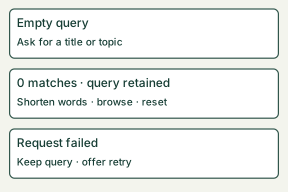
Zero matches, an empty query and a service failure describe three different states. A useful response preserves the person's work and explains the next available action. The following library example is a specification to apply and test, not a claim that an external search service has been connected.
Write the three states before styling them
Empty or spaces only: leave the field available and say “Enter a title or topic to search the library.” Do not announce that the library contains zero items.
Completed search, no matches: retain the fictional query “blue-moon atlas”. Use “No titles match ‘blue-moon atlas’. Try one word, check the spelling or browse the library.” Provide an actual link to the library and a clearly labelled reset action.
Request failed: keep the same query and say “Results could not be loaded. Try again.” Do not replace an unknown response with a count of zero.
In the no-match state, a first recovery attempt can remove the qualifier and search for “atlas”. If this still returns no matches, the browsing link remains useful. Do not promise a particular title exists: the example query and its recovery are invented teaching inputs.
A small status template
<p role="status" aria-live="polite">No titles match “blue-moon atlas”.</p>
<p>Try one word, check spelling, or browse the library.</p>
Keep the status container present before updating its text in a dynamic interface. W3C explains that a result message should be programmatically determinable without requiring focus to move to it. A status message does not replace a label for the search field or keyboard-operable recovery controls.
Acceptance script
With the keyboard, reach the labelled input, enter the unmatched query and submit. Confirm that the query remains, the message describes the completed search and the next Tab reaches a meaningful recovery control. Activate reset and confirm the field and result state reset together. Repeat with an empty string, spaces only and a simulated request failure. Check the visible message and its accessible announcement; keyboard focus must not disappear. Finally follow the library link and use Back: the response must still make sense if the browser restores the query.